OP-004 · Version 1.0.0
Project Gantt: Excel project schedule template
Gantt chart with working days, holidays, dependencies, progress and delay alerts, no macros.
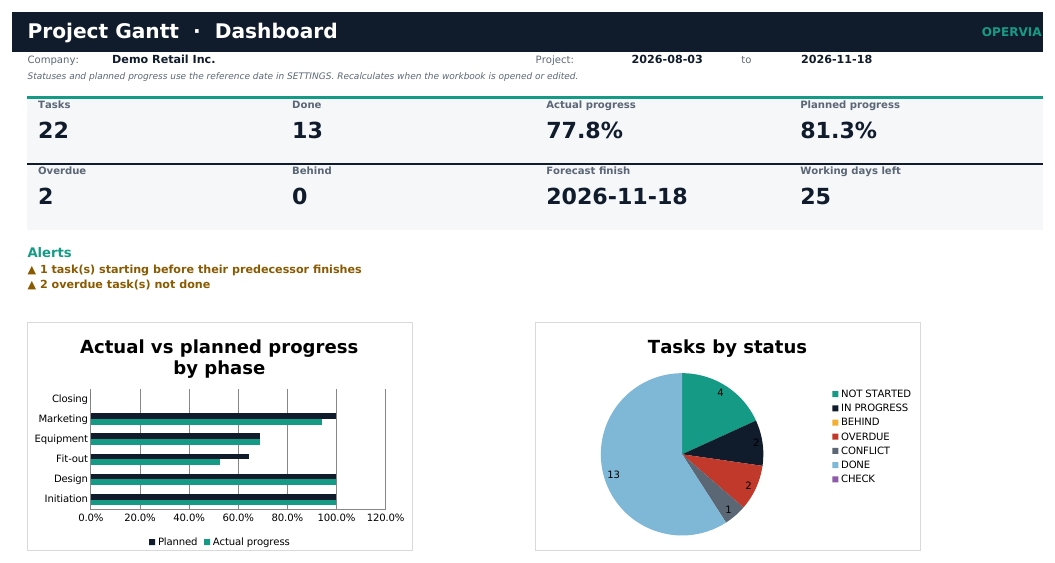
Project Gantt is an Excel workbook to plan projects and track progress with a weekly Gantt chart, without installing software.
Define tasks with start, duration in working days and predecessor. The workbook calculates the finish skipping weekends and holidays, compares actual with planned progress and flags late, overdue or conflicting tasks.
The dashboard shows project progress, the forecast finish and the working days left.
Features
- Finish dates calculated in working days with your holidays.
- Automatic weekly Gantt with progress and current week.
- Predecessors and date conflict warnings.
- Actual vs planned progress weighted by duration.
- Statuses: not started, in progress, behind, overdue and done.
- Phase reports and a list of tasks needing attention.
- Includes demo, PDF manual and quick start. No macros.
Who it is for
Small businesses, consultants, construction, marketing or IT teams managing projects of up to a few hundred tasks without project software.
What it does not include
No critical path, automatic rescheduling of successors, resources, costs or multiple predecessors per task.
Editions
| FREE (demo) | PRO | |
|---|---|---|
| Workbook with sample data | ✓ | ✓ |
| Empty template for your business | — | ✓ |
| Capacity | 60 tasks | 300 tasks / 26-week Gantt |
| PDF manual and quick start | — | ✓ |
| Minor updates within the same major version | — | ✓ |
What you get
- CHANGELOG.txt
- LICENSE.txt
- Project_Gantt_Demo_EN.xlsx
- Project_Gantt_EN.xlsx
- Quick_Start_EN.pdf
- README.txt
- User_Manual_EN.pdf
Requirements
Excel 2019 or later, Microsoft 365 or LibreOffice Calc 7.6+. Windows, macOS or Linux.
Questions about this product
Which Excel version do I need?
Excel 2019 or later, Microsoft 365 or LibreOffice Calc 7.6+.
How many tasks does it hold?
The PRO edition holds 300 tasks with a 26-week Gantt. The demo holds 60 tasks.
Does it consider holidays?
Yes. Enter your country's holidays in SETTINGS and they are excluded from working days.
Does it compute the critical path?
No. It handles one predecessor per task and warns about conflicts, but does not compute the critical path or reschedule automatically.
Version history
1.0.0 · 2026-11-16
- First release: tasks in working days with holidays, predecessors, actual vs planned progress, weekly Gantt, dashboard and reports.