OP-001 · Version 1.0.0
Inventory Pro: Excel inventory management template
Track stock, inventory value and reorder alerts in Excel, with no macros or subscriptions.
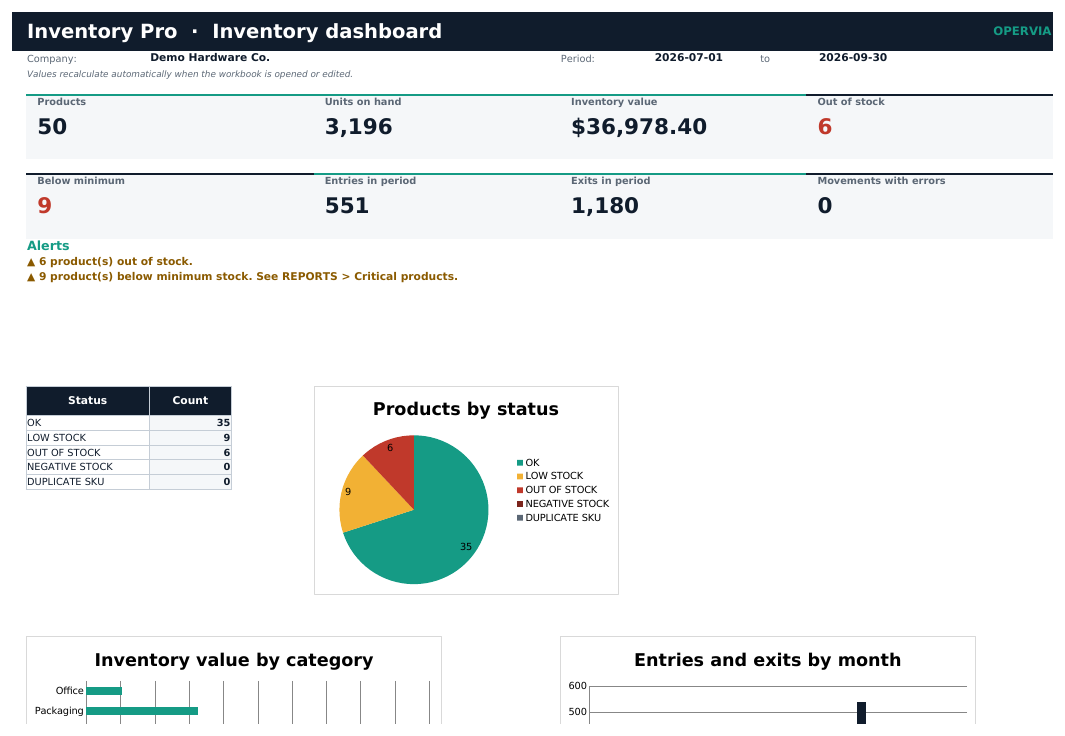
Inventory Pro is an Excel workbook to keep track of stock in a small business without installing software. You register your products and every goods movement; the workbook calculates current stock, inventory value and the status of each item.
The dashboard shows at a glance how many products you have, what your inventory is worth, what is out of stock or below minimum and how much came in and went out during the period. Reports group inventory by category and by month, list critical products with a suggested order quantity and show the kardex of any SKU.
Checks catch duplicate or unknown SKUs, invalid quantities, repeated movements and negative stock, so typing mistakes do not go unnoticed.
Features
- Current stock calculated automatically from receipts, issues, adjustments and returns.
- Dashboard with indicators, alerts and charts.
- Automatic critical products list with suggested order quantities.
- Kardex by SKU plus reports by category and by month.
- Checks for duplicate SKUs, unknown SKUs, invalid quantities and repeated movements.
- Includes demo workbook, PDF manual and quick start guide.
- No macros or external connections. Works in Excel and LibreOffice.
Who it is for
Small businesses, warehouses, stockrooms, workshops and startups that need to organize inventory without installing software.
What it does not include
Does not include multiple warehouses, lots, expiry dates or FIFO/average costing. Uses standard cost.
Editions
| FREE (demo) | PRO | |
|---|---|---|
| Workbook with sample data | ✓ | ✓ |
| Empty template for your business | — | ✓ |
| Capacity | 60 products / 250 movements | 1,000 products / 5,000 movements |
| PDF manual and quick start | — | ✓ |
| Minor updates within the same major version | — | ✓ |
What you get
- CHANGELOG.txt
- Inventory_Pro_Demo_EN.xlsx
- Inventory_Pro_EN.xlsx
- LICENSE.txt
- Quick_Start_EN.pdf
- README.txt
- User_Manual_EN.pdf
Requirements
Excel 2016 or later, Microsoft 365 or LibreOffice Calc 7.6+. Windows, macOS or Linux.
Questions about this product
Which costing method does it use?
Standard cost: a fixed unit cost per product that you define. It does not calculate FIFO or moving average cost.
How many products and movements does it hold?
The PRO edition holds 1,000 products and 5,000 movements per workbook. The demo holds 60 products and 250 movements.
Does it handle several warehouses?
No. Inventory Pro tracks a single location. For several warehouses you can use one workbook per warehouse.
What happens if I log a movement with an error?
The Validation column flags it and the movement is not added to stock until fixed. The dashboard shows an alert.
Version history
1.0.0 · 2026-11-16
- First commercial release: dashboard, products, movements, suppliers, reports, settings and instructions.
- Checks for SKUs, quantities, types, dates and duplicates.
- Kardex by SKU and critical products list with suggested order.